Programs
These are all links to Categorys of Programs to download. Click the Picture or the Link on the left.
NOTE: All programs should run on Windows 7 and Windows 10. They do not work on Apple, Android, Windows XP or earlier. If you see something you would like on Apple, let me know and I’ll see what I can do.
Also note that all programs are actually self-extracting zip files that will install the program (since not everyone has a program to un-zip a zip file). They have an ‘exe’ extension so you might get a warning from any Virus program you have running. After you download them, just execute the downloaded file and it will install the program.
Note that I update the programs occassionally..
I will add a version number on the page where you download it.
you can check the Help/About menu option on the program to see if you already have the latest version, and if not, you can download and install over your existing installation. It won’t overwrite any of your preferences or database entrys you may have made.

Notes on Installing Downloads.
after you download an ‘Installer’ file, find where you downloaded it and run it.
what is downloaded is a ‘zip’ file that will self-extract into the program or suite.
it will show an initial window where you can accept the default ‘Unzip to folder’, or change it to something else.
then click the Unzip button (not the Run WinZip’ button. ie: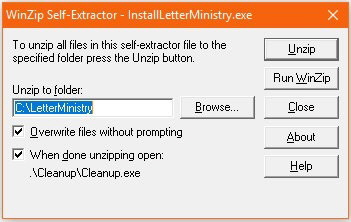
If the program being installed is a large program, if may ask if you want a shortcut on the desktop to run it later.. click ‘Yes’…Then it may say it is creating an initial database.. click ‘OK’.Then it will start the program up… and may give a warning to fill out the ‘Preferences’ soon…
NOTE: EVERYTHING is installed into a single folder… I don’t like how some programs install stuff all over your PC and monkey with the Windows Registry etc. If you want to delete the program, all you need to do is delete the folder it was installed in.
You can go thru the Help/View Help screens to see how it works..
JW programs
Audio programs
Other programs
Algorithm & Blues Development  Welcome to |
Eric Kundl Page